¶ Included in the Box
Thank you for purchasing the HTVRONT Automatic Heat Press. Before using this product for the first time,please read this product manual carefully and keep it for future reference.
| ·HTVRONT Automatic Heat Press X1 | ·Teflon SheetX1 |
| ·Heat Press MatX1 | ·User Guide EnvelopeX1 |

¶ Power

After powering on,the "Power" button flashes white. Press the "Power" button to turn on the machine.
¶ Temp
Press"Temp" and the temperature value flashes.Adjustthe temperature immediately with the or "-" button.Long press the "Temp" button for2 s to convert units.
¶ Time
Press "Time"and the time valueflashes.Adjustthe time immediately with the"+"or"-" button.

¶ Increase
Short press (press once): Temp willincrease by ; time willincrease by1s.
Long press: increase the temperature or time by5 units continuously until you stop pressing.

¶ Decrease
Short press (press once): Temp will decrease by time will decrease by1s.
Long press: Decrease the temperature ortime by5unitscontinuouslyuntilyou stop pressing.

¶ Start
Press the "Start" button to iron automatically with a countdown.The "Start" button flashes red when preheating,then turns green once it reaches the set temperature.

¶ Mode
Press the "Mode" button to switch between 4 modes.The corresponding mode icon \textcircled{1} \textcircled{2} \textcircled{3} \textcircled{4} \textcircled{4} willight up respectivelyonthedigitalscreen.Once intoamode,thetemperatureandtimeare fixed.Pressthe "Mode" button for to exit the mode.
Mode \textcircled{1} /15s Mode \textcircled{3} 165°C (330°F) /20 s Mode \textcircled{2} 160°C(320°F)/15s Mode④200°C(390°F)/40 s

¶ Custom
Press the "Custom" button to customize the setings(max: two modes). Press the "Temp" or "Time" button and adjust the temperature or time immediately with the or "-" button.Press the "Custom" button for 1.5 s to exit.

¶ Auto
Aftersetting the temperature and time,press the "Auto"button to startautomatic ironing. Once the ironing board is pushed in place,the machine willpress down on the project continuously without pressing the "Start"button.Pressthe"Auto"buttonagain toexitthemode.
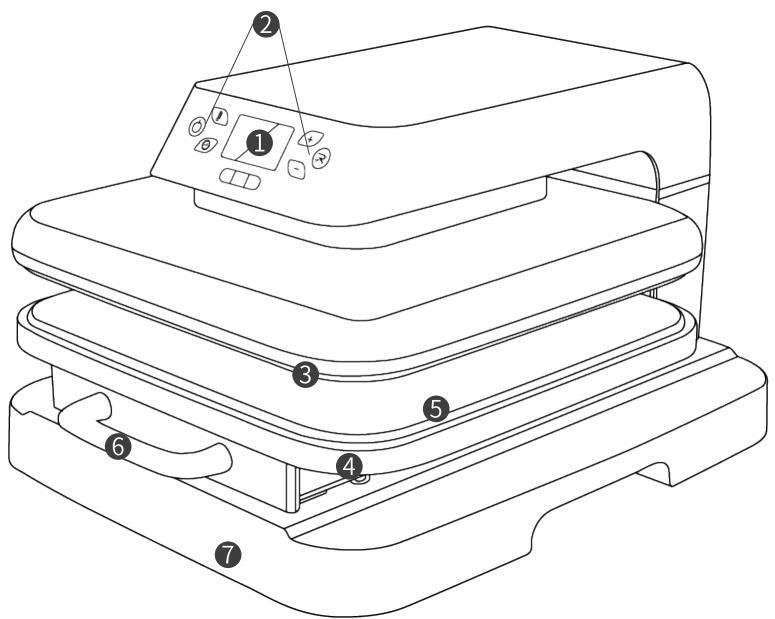
- LED Screen 2. Buttons
4.Ironing Board5. Heat Press Mat - Base
Time: 1-199 sTemp:100-210°C(210 -410F)
¶ Usage Notes
- Please iron the fabrics before transferring the images to them;
2.Pleaseensuretheroningboardhasbeenfullypushedinplace.Otherwise,therewillbebeeps;
3.The ironing processis done after the countdown;
4.The screen willdisplay the last settings when restarting the machine.
¶ Instructions for Use
¶ Step1
Power on the machine.
Step2 Press the "Power" button to turn on the machine (Default setting:
Step3 Setthe proper temperature and time to preheat the machine.The"Start" button is red during the process.
Step4 Once the "Start" button turns green,pull the ironing board outand ensure there is a heat prees pad.
Step5 Place the fabric on the mat and iron it until there are no wrinkles.
Step6 Place the materials on the fabric,then the Teflon sheet on top.
To reducethe risk of electric shock,this product has apolarized plug (one blade is wider than the other).This plug is intendedtofitinapolarizedoutletonlyonewayWhentheplugdoesnotfitfullyintheoutlet,reversetheplug.Whenitstil does notfit,contact a qualified electrician to installthe properoutlet. Do not change the plug in any way.
Close supervision is required when this product is used near children.
HOUSEHOLD USE ONLY.
DO NOT IMMERSE IN WATER.
Whenthe appliance provided witha power-supplycord thatis less than4-1/2feet(1.4m)long shallbe provided with instructions that include the following information:
a)Ashort power-supply cord (orshortdetachable power-supply cord)is provided to reduce therisks resulting from becoming entangled in or tripping overa longer cord;
b)Extension cords (or longer detachable power-supplycords)are available and arenot prohibited from being used when care is exercised in their use.
c) When an extension cord is used:
1)The marked electricalratingofthe detachable power-supplycord orextension cord shallbeno less thanthe marked electrical rating of the product;
- The longer cord shallbearranged so thatit does notdrape over the counter-topor tabletop where it is capable of being tripped over,snagged,or pulled on unintentionally,especially by children.
¶ Step7
Press the "Start" button and iron.
- Do not use this product outdoors.It's only for household use;
2.This product hasto work onastable,flat,and heat-resistant surface.Please payatention to the safety of its Surrounding environment while in use;
3.When usingthis product,please keep an eyeon it toavoid accidents.Turnoffthe productand unplug the power cord while leaving;
4.When there are beeps and E1" or on the screen,please cut the power immediately and restart.Feel free to contact us if you have more questions; - Do not touch the heat plate after powering on to prevent burns;
- Do not let the power cord touch the heat plate during the operation;
- Please unplug the power cord after use or before cleaning the product;
8.Please stop using the productimmediately and contact HTVRONT's customer service once the product is malfunctioned or damaged; - Do not immerse the product in any liquid;
- Children under 14 years old MUST have adult supervision while using the machine.

¶ Memory mode
The set temperature and time will be remembered for the next operation.
¶ Auto turn-off
This machine will turn off automatically if there's no operation in 15 minutes. There will be beeps and flashing lights in the last 10 seconds before the shutdown.
¶ CLEANING AND MAINTENANCE

¶ Emergency stop
Press any button when the heating area is closing,and the heating area will reset and open.
Before performing cleaning and maintenance,ensure that the powersupply has been turned of,unplug the power cord,and wait for the body to completely cool before performing cleaning and maintenance.
¶ Storage function
Long press the"Time"and "Decrease" buttons for3 seconds,then the machine will close the heating plate and ironing boardautomaticallyfor better storage.
Do notput the appliance into water.Please useasoft drycloth todrythe body without using special cleaning agents to clean it.
Whenthe productis notinuse,please clean itand placeitinacleanandventilated place,andstore itoutofthe reach of children.
¶ FCC Warning
Thisdevicecomplies with part15oftheFCCRules.Operation issubjectto thefollwingtwo conditions:(1)This device may notcause harmfulinterference,and(2)thisdevice mustacceptany interference received,includinginterference that may cause undesired operation.
Any changes or modifications not expressy approved by the party responsible for compliance could void the user's authority to operate the equipment.
This equipment has been tested and found tocomplywith thelimitsfora Class Bdigitaldevice,pursuanto part15of theFCCRules.Theselimitsaredesigned toprovidereasonable protectionagainstharmfulinterferenceinaresidential installation.Thisequipment generatesusesand canradiateradiofrequencyenergyand,if notinstalledand used in accordance with the instructions,may cause harmful interference to radio communications. However,there is no guarantee thatinterference willnotoccurinaparticularinstallation.Ifthis equipmentdoescauseharmfulinterference toradioortelevisionreception,whichcanbedetermined byturningtheequipmentoffandon,theuserisencouraged to try to correct the interference by one or more of thefollowing measures.
¶ Specifications
| Materials | Textile | Settings | Note |
| PVC Heat Transfer Vinyl | Cotton,Polyester,etc | Temp:145-155C(293-311°F)Time: 15s | Cold/Warm Peel |
| PU Heat Transfer Vinyl | Cotton,Polyester,etc | Temp:145-155C(293-311°F)Time: 15 s | Cold/Warm Peel |
| Glitter Heat Transfer Vinyl | Cotton,Polyester, etc | Temp:150-160°C(302-320°F)Time:15s | Cold Peel |
| Sublimation Paper | Polyester,Cotton≤30%,etc | Temp:180-200C(356-392F)Time:35-45s | Hot Peel |
| Heat TransferPaper(Dark Fabric) | 100 % Cotton | Temp:150-160C(302-320°F)Time: 15 s | |
| Heat TransferPaper(Light Fabric) | 100 % Cotton | Temp:150-160°C(302-320°F)Time:15 s |
HTVRONT Automatic Heat Press
| Model | HPM15 | Power Consumption | 1400-1600 W;1500 W | |
| Input Voltage | 220-240V~ 50-60 Hz;120V~ 60 Hz | |||
| Temperature | 100~210°C(210~410°F) | Time | 1-199 s | |
| Product Size | 50.0 × 41.4× 29.0 cm(19.7 × 16.3 × 11.4 in) | Package Size | 57.5×45.0×34.5 cm(22.6 × 17.7 × 13.6 in) | |
| Product Weight | 16.7 kg(36.7 b) | Package Weight | 18.5 kg(40.8 Ib) | |
¶ HTVRONT Automatic Heat Press Limited Warranty
This product is covered byaone-year warrantyfrom the date ofpurchase.Ifadefect occurs under normal use within the warranty period,we willprovide warranty service.Proof of purchase is required to claim warranty service. HTVRONTaccessoriesare covered byafree warranty forthree monthsfromthedate ofpurchase.Intheeventthatany warranty terms conflict with applicable locallaws and regulations,the local laws willtake precedence.
To theextent permited byapplicable laws,HTVRONTis not responsibleforthe warrantyin thefollowingsituations: malfunctions caused byimproperuse,maintenance,and storagebyconsumers; malfunctionscaused byself-repairor dismantling by those who do not undertakethe three-guarantee repair without the permission of our company; products that can continue to be used after repair when the warranty expired;damage caused by force majeure. Meanwhile,HTVRONTdisclaims allimpliedand legal warranties,including warrantiesof merchantabilityandfitness fora particularpurpose.The warranties that are allwed to be denied are forthe duration of this warranty.
Proof of purchase may be required to verify warranty eligibility.