¶ Included in the Box
Thank you for purchasing HTVRoNT Auto Heat Press 2 - Digit. Before using this product for the first time, please read this user manual carefully and keep it for future reference.
| HTVRONT Auto Heat Press 2 - Digit | Teflon Sheet×1 |
| Heat Press Mat×1 | User Manual×1 |
¶ Machine Overview
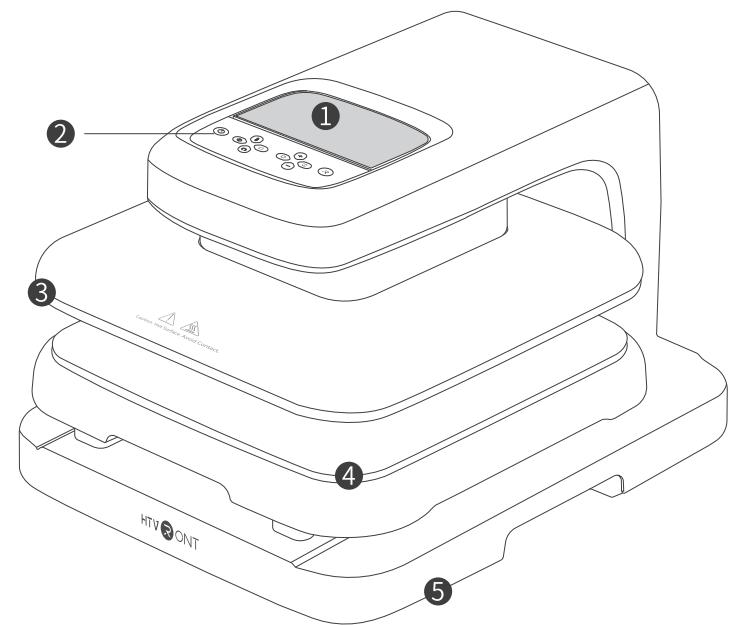
- LED Screen 2. Buttons 3. Heat Plate
- Ironing Board 5. Base
Time: 1 ~ 999 s Temp: 100 ~210° (210 ~ 410°F) Pressure: 20 ~ 80 kg (50 ~ 170 lb)
¶ Details of Buttons

¶ Power
Aerpg,he "owrut fashewhi.Press the "owe"ut unon theac.

¶ Temp
Short press (press once):The temperature value flashes.Adjust the temperature immediately with the or"button;
Long press (2 s): Convert the temp units -

¶ Time
he"Tmeuanhvasheuheeier"
¶ Pressure

Short press (press once): The pressure value flashes. Adjust the pressure immediately with the "I or "- "button;
Long press (2 s): Convert the pressure units .
¶ Increase

Short press (press once): Temp will increase by will incs y ;esuewill incas by 10 kg(20 lb);
Long press : Increase the temperature by 10 units, time by 10 units, or pressure by continuously until you stop pressing

¶ Decrease
Short press (press once): Temp will decrease by il d ypill d by 10 kg(20 lb);
Long press Decrease the temperature by 10 units, time by 10 units, or pressure by 20 kg(40 lb) sl o .
¶ Mode
reshe "Mode"utton wi mong preetmos.The selecmo \textcircled{1} \textcircled{2} \textcircled{3} \textcircled{4} ) will light up on thedigl ceinglyressthe "oe"utnfor
*Note: The temperature, time, and pressure of the four preset modes are fixed.

| Mode | Ironing Parameters | Recommended Materials |
| ① | 145°C (295°F)/15 s/80 kg (170 lb) | Pure Heat TransferVinyl, Chameleon Heat TransferVinyl |
| ② | 150°C (300°F)/15 s/80 kg (170 lb) | GlitterHeat TransferVinyl, Holographic Heat TransferVinyl, DTF Transfer Film |
| ③ | 160°C (320°F) /20 s/80 kg (170 lb) | Printable Heat TransferVinyl, Heat Transfer Paper |
| ④ | 200°C (390°F) /40 s/80 kg (170 lb) | Sublimation Paper |
¶ Custom
Press the "Custom" button to customize the ironing modes (Max: Four modes). Select one mode and the ecmodon willhtupon theigal crengly ress the "Temp", Tme"or "Pree" button and adjust the settings with the or "-" buttn.Presshe "Cusom" utton for s to xit.

¶ Auto
A plac,hemachine wll pressdownon the proje contiuuywithou pressgthe "Sar" utn res the "Áuto" button again to exit.
¶ Start
Press the "Start" button to iron automatically with a countdown. The "Start" button flashes red when preheating, then turns green once it reaches the set temperature.
¶ Functions
¶ Memory mode

The set parameters will be remembered for the next operation;
¶ Auto turn-off
This machine will turn off automatically if there's no operation in 15 minutes. There will be beeps and flashing lights in the last 10 seconds before the shutdown;
¶ Emergency stop

Press any button when the heat plate is descending, and the heat plate will stop descending and back to the original position;
¶ Back to the default setting (100°C/210°F, 20 s, 50 kg/110 lb

Press the "Power" button for 5 s to turn off the machine and reset the settings.
¶ Usage Notes
- For fabrics, please iron them first to remove wrinkles before heat transferring;
- Please ensure the ironing board has been fully pushed back before pressing the "Start" button to iron.
¶ Instructions for Use
Poweron the machine;
Press the "Power" button to turn on the machine (Default setting: 100°C/210°F, 20s, 50 kg/110 lb);
Set the proper temperature,time, and pressure to preheat the machine. The "Start"button is red during the process;
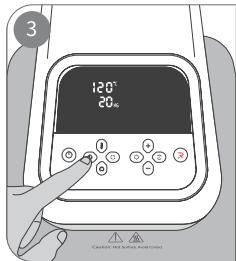
Once the"Start" button turns green, pull out the ironing board and ensure thereisaheat press mat;
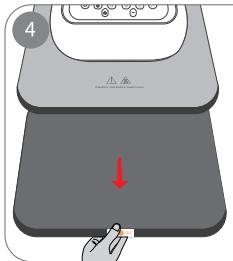
Place the substrate and material on the heat press mat in order; fix the material with the heat-resistant tape (*Not included in thebox)andcover with the Teflon sheet;
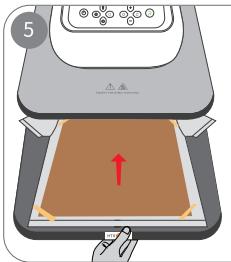
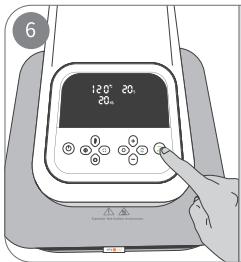
Press the "Start" button to start the countdown and iron;
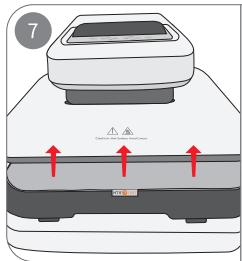
After the countdown, the heat plate will ascend to the original position.
¶ Precautions
To reduce the risk of electric shock, this product has a polarized plug (oade is wider than the other). This plug is
intended to fit in a polarized outlet only one way. When the plug does notully in the outlet,reverse the plug. When
it still does not fit, contact a qualified electrician to install the propo not change the plug in any way.
Close supervision is required when this product is used near children.
HOUSEHOLD USE ONLY.
DO NOT IMMERSE IN WATER.
When the appliance provided with a power-supply cord that is less than 4 -4 m) long shall be provided with
instructions that include the following information:
a) A short power-supply cord (or short detachable power-supply cord) is prerisks resulting from
becoming entangled in or tripping over a longer cord;
b) Extension cords (or longer detachable power-supply cords) are availableilbited from being used
when care is exercised in their use
c) When an extension cord is used:
- The marked electrical rating of the detachable power-supply cord or extshall be no less than the marked
electrical rating of the product; - The longer cord shall be arranged so that it does not drape over the coter-top or tabletop where it is capable of
being tripped over, snagged, or pulled on unintentionally, especiallyby children.
- Do NOT use this product outdoors. It's ONLY for household use;
- You can ONLY use this product on a flat,stable,and heat-resistant surfa
- Keep the product away from flammables while in use;
- When using this product, please keep an eye on it to avoid accidents. Tduct and unplug the power cord
while leaving; - Do NOT touch the heat plate after powering on to prevent burns;
- Do NOT let the power cord touch the heat plate during the operation;
- Please note the distance between your hands and the heat plate while puback the ironing board to prevent bums;
- After use,please wait until the machine is completely cool beforestoring it away;
- Please unplug the power cord after use or before cleaning the product tlectric leaks and any risks;
- Do NOT immerse the product in any liquid;
- When there are beeps and "E1/E2/E3/E4/E5" on the screen, please cut thtely and restart. Feel free
to contact HTVRONT's customer service if you have more questions; - If the product is malfunctioning or damaged, please stop using the proliately and contact HTVRONT'S
customer service; - Children under 14 MUST have adult supervision while using the machine;
- To prevent leakage and other accidents, Please use this machine accordto the product manual,and do not use it
for other purposes; - Please check the power cord regularly to prevent accidents.Ifthe poweraged,it must be replaced by the
manufacturer or professionals from a qualified service agency; - Please hold the plug firmly when unplugging the product.Do not pull thpower cord directly
¶ CLEANING AND MAINTENANCE
Before performing cleaning and maintenance, ensure that the power supply hturned off, unplug the power
cord, and wait for the body to completely cool before performing cleaning maintenance.
Do not put the appliance into water. Please use a soft dry cloth to dry thut using special cleaning agents to c
When the product is not in use, please clean it and place it in a clean anlated place, and store it out of the
of children.
¶ Specifications
| Product Name | HTVRONT Auto Heat Press 2 - Digit | Model | HPA01 |
| Input | 120V~60Hz 1500W | Temp | 100°-210°C (210°F-410°F) |
| Time | 1-999 s | Heat Plate Size | 38.1 × 38.1 cm/15 × 15 in |
| Product Size | 53.0 X 43.5 X 33.0 cm20.9 X 17.1 X 13.0 in | Package Size | 58.5 x 49.5 x 38.5cm23.0 X 19.5 X 15.2 in |
| Product Weight | 19.6kg /43.2 lb | Package Weight | 21.5 kg/47.4 lb |
¶ FAQs
Q1: What to do if the heat plate cannot lift up after pressing down?
A1: Turn off the machine and wait until it is completely cool. Turn the machine on and gently shake the ironing board
while pressing the "Start" button simultaneously;
A2: Contact HTVRONT's customer service if the above step doesn't worrk.
Q2: Why does the heat plate not press down after pressing the "Start"button?
A1: Make sure the ironing board has been fully pushed back into place;
A2: Contact HTVRONT's customer service if the above step doesn't work.
Q3:Whydoes the machine emit slight smoke?
Al: It's normal as the moisture caused by a long-time unused or a humid enment will evaporate when heated;
A2: It is normal as the sublimation ink will sublimate into gas at high tes when using sublimation materials.
Q4: Why is my machine making beep sounds?
A1: Beep once: the machine is powered, turned on/off, finishes tirme/temp/pressure setting.or the countdown ends;
A2:Beep constantly: the heat plate is pressing down:
A3: Beep constantly with "E1/2/3/4/5" on the screen: cut the power immediately and restart the machine. Contact
HTVRONT's customer service if this step doesn't work.
¶ HTVRONT Auto Heat Press 2 - Digit Limited Warranty
The warranty period of this machine is one year from the date of purcChase. Other HTVRONT accessories (such as heat
insulation pads, high-temperature cloth, etc.) are guaranteed for free witmonths from the date of purchase.
Warranty service is available when there's a malfunction in normal use durarranty period. If consumers need
warranty service,they need to provide proof of purchase.
To the extent permitted by applicable laws, HTVRONT is not responsible forarranty in the following situations:
malfunctions caused by improper use, maintenance, and storage by consumers; malfunctions caused by self-repair or
dismantling by those who do not undertake the three-guarantee repair without the permission of our company
products that can continue to be used after repair when the warranty expired; damage caused by force majeure
Meanwhile, HTVRONT disclaims all implied and legal warranties, including vwarranties of merchantability and fitness
for a particular purpose.The warranties that are allowed to be deniedare for the duration of this warranty.
Proof of purchase may be required.